
POKERLAB RNG
A small random number generator for GTO mixed frequencies.
What it does
PokerLab RNG rolls a random number from 1 to 100. You decide how often you want to bet or raise — say 50 percent — and the program rolls the number for you, so the decision is random and honest instead of a feeling. It is the same idea as rolling a die or looking at your watch, just quicker and easier to repeat.
It is not a tracker, not a HUD and not a solver. It does not read your tables, does not count hands, stores no statistics and never goes online. It only rolls a number.
How it works
- Set your frequency. Click 25, 33, 50 or 75 percent, or drag the slider to any value between 1 and 100.
- Roll. Press the big ROLL RNG button, the space bar, or click the number card itself. With Hover mode on, the mouse passing over the card is enough.
- Read the answer. A roll inside your frequency shows BET / RAISE in green; a roll above it shows CHECK / FOLD in grey. With a frequency of 50 percent, a roll of 12 means BET / RAISE and a roll of 58 means CHECK / FOLD.
The screen
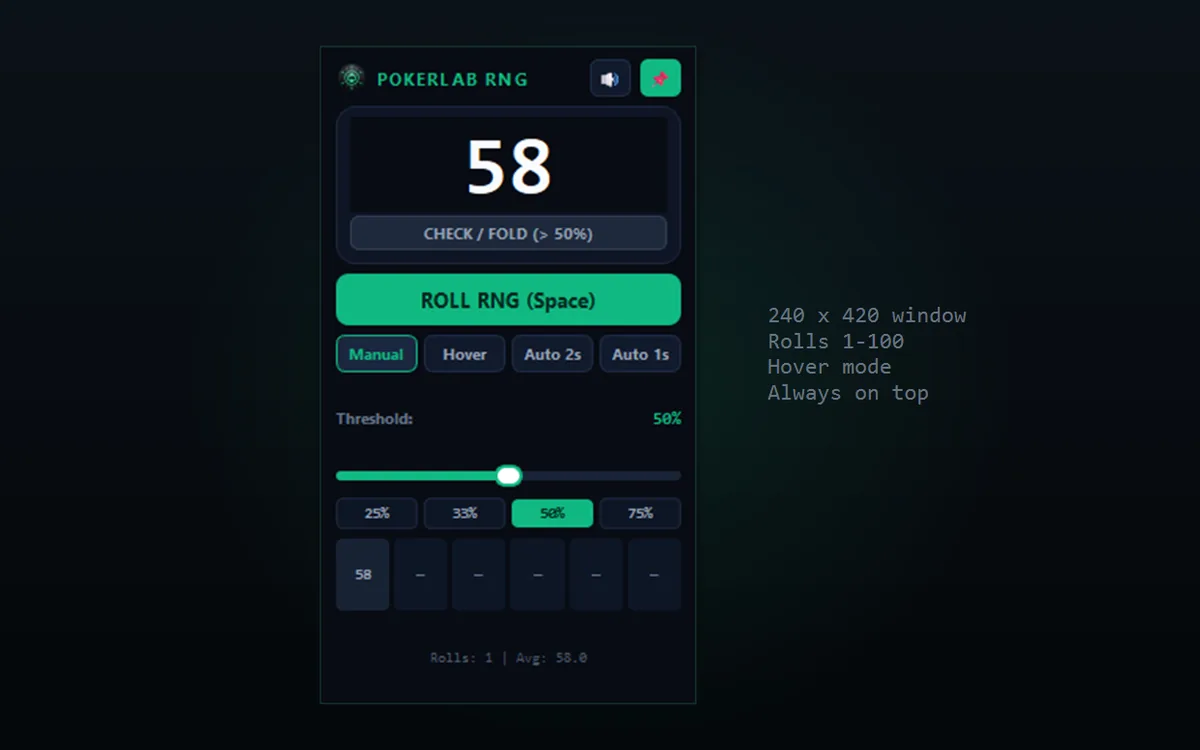
| Part of the window | What it does |
|---|---|
| The big number | The latest roll, from 1 to 100. Click the card to roll again. |
| Green or grey line underneath | The action that follows from the roll and your frequency. |
| ROLL RNG (Space) | Rolls a new number. |
| Manual / Hover / Auto 2s / Auto 1s | How rolls happen: only when you ask, when the mouse sweeps over the card, or on a timer. |
| Threshold and the slider | Your frequency, in percent. |
| 25% / 33% / 50% / 75% | Quick buttons for the frequencies most players use. |
| The row of small boxes | Your last six rolls. |
| Rolls / Avg | How many times you have rolled this session, and the average. |
| Speaker and pin button | Sound on or off, and keep the window on top of your tables. |
Keyboard shortcuts
| Key | Action |
|---|---|
Space | Roll a new number |
H | Turn Hover mode on or off |
A | Turn Auto-roll (2 seconds) on or off |
T | Turn "always on top" on or off |
M | Mute or unmute the sound |
Up / Down | Frequency plus or minus 5 percent |
Questions
secrets module, which is built for cryptographic randomness. Each value from 1 to 100 is equally likely, and a low roll never makes a high roll more likely.PokerLabRNG.exe.Download PokerLab RNG v1.0
Unzip the file anywhere and double-click PokerLabRNG.exe. No installation, no account, no internet connection.
The download comes from GitHub Releases (release v1.0.0). The zip holds PokerLabRNG.exe, README.txt, Start.bat and the program icon.