OpenPokerLab • PokerEquity Lab v1.0.0 • Free equity and range calculator for Windows
See how often your hand wins — before the money goes in
PokerEquity Lab is a free Windows program that answers one question: how often does each hand win?
Pick the cards, or draw the ranges you think your opponents play, and press Calculate.
You get win, tie and lose percentages plus the equity for two to ten players — before the flop, or
on a flop, a turn and a river. The answer is counted exactly whenever the situation allows it and
estimated very closely everywhere else. No account, nothing to install and no internet connection needed.
Mode: Auto · Runouts: 200000 · Board: Preflopportable · v1.0.0 · no installer · no network calls
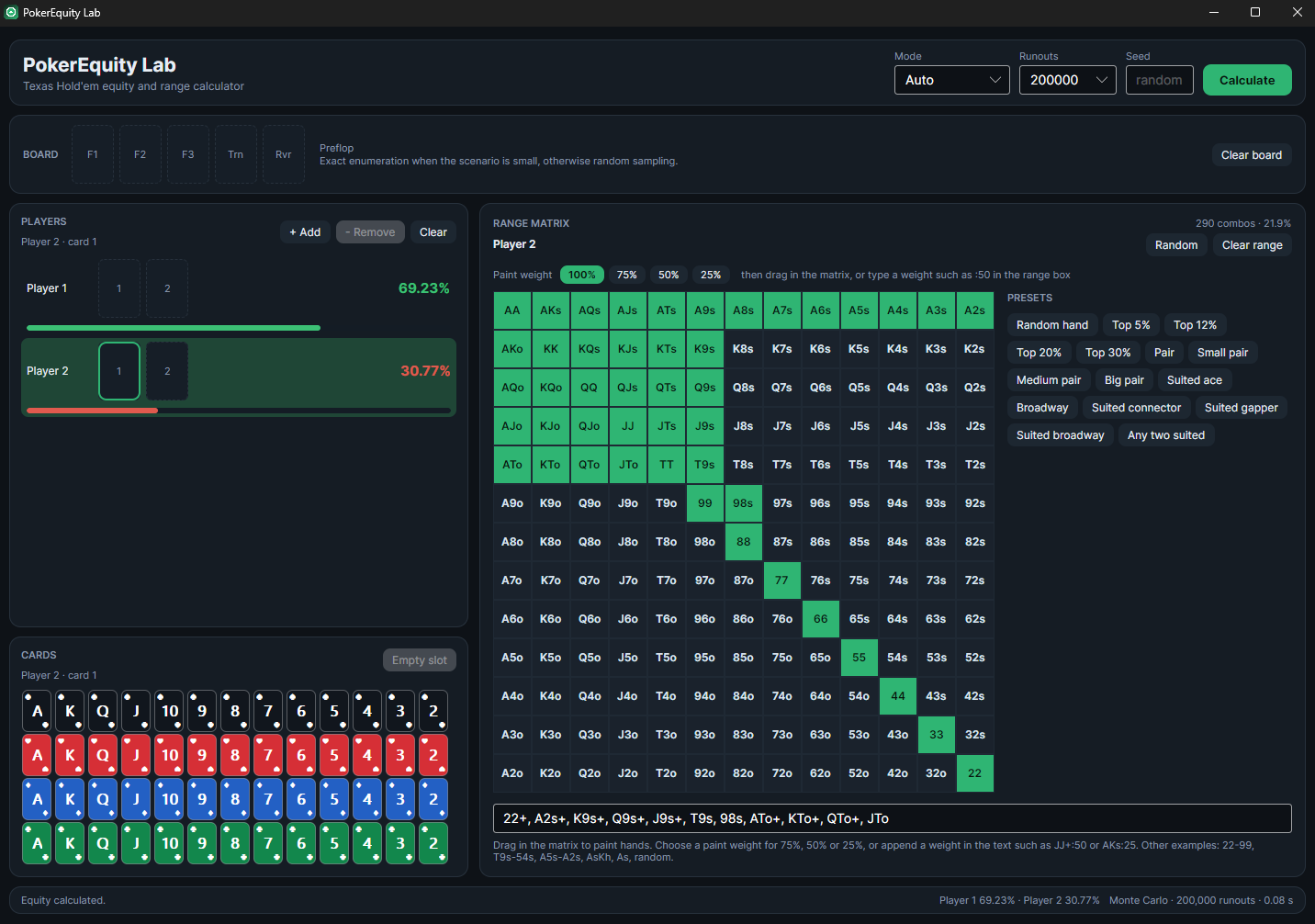
The whole program is this one window. On the left you see the players and the deck of cards; on the right the 13x13 range grid with the paint weights and the ready-made ranges. The line at the bottom tells you what just happened. The picture above shows JJ+, AKs, AQs+, KQs:50 against Top 30%: 69.23% against 30.77% after 200,000 runouts in 0.08 seconds.
What you can do
Everything you need to check a hand
Compare two hands, two ranges or ten players — on any board. Here is what the program gives you, explained in plain language.
⚖️
Equity for 2 to 10 players
Add as many players as your table has. In small spots the program counts every possible runout; in big ones it switches to a fast random sample — and the status line always tells you which of the two you got.
🎨
Draw ranges with your mouse
Hold the left mouse button and drag across the 13x13 grid to add hands; drag across them again to take them away. The range text and the hand counter ("290 combos · 21.9%") follow along on their own.
🖌
Mix in weights
Playing a hand only half the time? Paint it at 100, 75, 50 or 25 percent, or type the frequency in the range box as JJ+:50 or AKs:25. Cells painted below 100% show their weight in the corner.
⚡
Ready-made ranges in one click
Top 5, 12, 20 and 30 percent, pairs, suited aces, broadways, suited connectors, gappers or any two suited — and Random hand, which simply means "any two cards" for an opponent you know nothing about.
🃏
Add a board and see who is ahead
Click the flop, turn and river slots and pick the cards from the deck. Cards that are already in play are greyed out, so one card can never be dealt twice. Every player also gets the current hand in words, like Two pair, aces and kings.
📊
Numbers you can repeat
Equity in percent, coloured from red through amber to green, plus win, tie and lose for every player. Choose how many runouts to use, and set a seed if you want to get the exact same sample again later.
Documentation
The complete user guide
Five short chapters in plain language: getting started, drawing ranges, the range text, the board, and the settings plus what is in the download.
Your first equity number in two minutes
PokerEquity Lab is a single Windows program. There is nothing to install, no extra download and no account to create — and it does not write anything outside the folder you unzip it into.
1
Unpack the portable package
Right-click the ZIP and choose Extract All. Anywhere will do — Desktop, a tools folder or a USB stick. You get PokerEquityLab.App.exe and a short README.txt. Prefer a normal installation? Run the setup instead: it installs the program for your user with a Start Menu shortcut and an uninstaller, and it needs no admin rights.
2
Build the scenario
Click the first card slot of Player 1 and pick two cards from the palette, or leave the slots empty and just describe the range. Do the same for Player 2. Use + Add and Remove to play between 2 and 10 opponents.
3
Press Calculate
Every player gets an equity percentage, win / tie / lose, and a plain English hand readout. The highest equity is highlighted, and the status bar tells you the mode, the number of runouts and how long it took.
💡 Pro-tip: start from a preset
Click Top 30% for one player and Random hand for the other, then press Calculate. Five seconds of work and you already have a baseline read — refine the range from there by painting the matrix.
JJ+, AKs, AQs+, KQs:50
Draw the range instead of typing it
The 13x13 grid is the range editor. The diagonal holds the pairs, the cells above it are suited hands (AKs) and the cells below it are offsuit hands (AKo). The counter in the top right corner tells you exactly how big the range is: 290 combos · 21.9%.
✓
Painting: hold the left mouse button and drag across the grid to add hands, drag across painted cells to take them away. The range text below the matrix updates the moment you release the button.
✓
Weights: playing a hand only sometimes? Choose a paint weight (100, 75, 50 or 25 percent) and drag. A cell painted below 100% shows the weight in its corner, and :50 means the same as :0.5.
✓
Presets: the buttons beside the matrix drop in a ready-made range — Top 5 / 12 / 20 / 30%, pairs (small, medium, big), suited aces, broadways, suited connectors, suited gappers and any two suited.
✓
Random, Clear range, Clear:Random gives the selected player every hand, which simply means "any two cards". Clear range empties one player, and Clear resets every range and the board.
🔁 The matrix and the text are the same range
Paint a range and the text box writes itself; paste a range into the text box and the matrix repaints. Nothing is ever hidden in one of the two views.
22-99, T9s-54s, A5s-A2s, AsKh, As, random
The range language in one page
A range is a comma separated list of hands. Pairs are written as two equal ranks, suited hands get an s and offsuit hands an o; leave the suffix out to mean both. A weight is appended with a colon, and a single card on its own means "this card plus any other card".
Example
What it means
Size
AA, AKs, AKo
A pair, a suited hand, an offsuit hand
6 / 4 / 12 combos
AK
Suited and offsuit: both are included
16 combos
JJ+
JJ, QQ, KK, AA — every pair from JJ upwards
24 combos
AQs+
AQs, AKs — same high card, better kickers
8 combos
22-99
Every pair from 22 through 99
48 combos
T9s-54s
Suited connectors with the same one card gap, T9s down to 54s
24 combos
A5s-A2s
Suited aces with a kicker from 5 down to 2
16 combos
AsKh
One exact combination: the ace of spades and the king of hearts
1 combo
As
Every combination that contains the ace of spades
51 combos
JJ+:50
Half weight for every combo of JJ+ (also written JJ+:0.5)
24 combos at 50%
random or *
Every hand at 100% — the "any two cards" range
1326 combos
Combos and percentages
There are 1326 possible starting hands. The counter in the corner of the grid always shows how many of them your range contains — as a number and as a percentage of all hands. "290 combos" is the 21.9% you see up there, so you can compare your own range with the charts you study.
A weight counts a hand as a fraction of itself: painted at 50% it counts as half a hand. That is how you build a mixed range such as JJ+:50, AKo:25 without leaving the program.
📋 Copy a range into the box
A range copied from your notes, your charts or a solver export usually works as-is — paste it into the range box and the matrix follows. If something cannot be parsed, the app says so under the box instead of guessing.
99+, AJs+, KQs, AQo+, JJ:50
Put a board down and see who is ahead
The board row at the top is a flop, a turn and a river waiting to happen. Press a slot, then click a card in the palette — the board stays contiguous, so you can never leave a hole in the middle of a flop.
🃏
The board:F1, F2 and F3 are the flop, then Trn and Rvr. The label next to the row tells you where you are (Preflop, Flop, Turn, River) and what the program is about to do. Clear board empties it again.
🂡
The palette: 52 cards in a four colour deck — black spades, red hearts, blue diamonds and green clubs, with the rank large in the middle and the suit in the corner. Cards that are already in play (a hole card or the board) are dimmed, so a card can never appear twice. Empty slot clears the selected slot.
📈
The result: after Calculate every player row shows the equity percentage, win / tie / lose, and a readout of the current hand such as Two pair, aces and kings. Equity is coloured red below 30%, amber around 50% and green above 70%, and the player in front is highlighted.
📊
The status bar: the bottom line reports what happened, for example Equity calculated. Player 1 69.23% · Player 2 30.77% · Monte Carlo · 200,000 runouts · 0.08 s. If a range is empty or a card is missing the bar says so instead of showing a number.
🃏 Reading a flop spot
Give both players a range, put a flop down, and press Calculate: you get the range versus range equity as well as the current hand each side actually holds. Add the turn or the river and the numbers tighten — the same scenario, one street further.
F1 F2 F3 · Trn · Rvr
Settings, numbers and what is in the download
Two settings decide how the numbers are found: the mode and the number of runouts (one runout is one complete deal of the remaining cards). Everything else you can safely ignore until you need it.
✓
Mode Auto: counts everything exactly when the spot is small enough, and samples when it is not. This is the default, and the right choice if you are unsure.
✓
Mode Exact: always counts every possibility, so nothing is estimated. AA against KK comes out as 81.9% because every deal was looked at.
✓
Mode Monte Carlo: always samples, using the number of runouts you choose — 10,000, 50,000, 200,000 (the default), 1,000,000 or 5,000,000. More runouts give a tighter number and take a little longer.
✓
Seed: leave the box empty and every calculation is a fresh sample. Type a number such as 12345 and you get the same sample back — handy when you compare two ranges.
✓
In the portable download:PokerEquityLab.App.exe and a short README.txt, nothing else to look after. Unzip it anywhere, and delete the folder again when you are done with it. The installer version instead puts the program in your own user folder with a Start Menu entry and an uninstall button; neither version needs admin rights.
✓
Check your download:SHA256SUMS.txt on this page lists a fingerprint (SHA-256) of both files. Run certutil -hashfile "PokerEquityLab-1.0.0-win-x64.zip" SHA256 in a command prompt and compare the long string. Windows may also warn that the program is not signed yet — choose More info and then Run anyway if the fingerprint matches.
At a glance
Players: 2 to 10
Board: flop, turn, river
Range matrix: 13x13, paintable
Paint weights: 100 / 75 / 50 / 25%
Presets: 15 one-click ranges
Runouts: 10k to 5M
Runtime needed: none
Network calls: none
📁 Does it save anything?
No. The program never writes a database, never touches the registry and never contacts a server. Your last scenario lives in the window while it is open, and when you close it, nothing is left behind but the folder you unzipped. Copy that folder to a USB stick and the whole program travels with it.
PokerEquityLab.App.exe · README.txt
Fair play
Where does a calculator like this fit in the rules?
PokerEquity Lab is an ordinary offline program. It does not connect to a poker room, it shows nothing on your tables and it never plays for you — it is made for studying hands away from the table. What you are allowed to run while you play differs from room to room, so here is the honest picture.
Criterion
Tools that help you live
PokerEquity Lab
Connection to a poker client
❌ Trackers and HUDs attach to the client
✓ Nothing — the app never looks for a poker room
Process access, hooks or injection
❌ Reads client memory
✓ Zero — no access to other processes
Network activity
⚠️ Licence checks, hand uploads, cloud sync
✓ 100% offline — no account, no telemetry
Real-time assistance (RTA)
❌ Live solver hints and strategy advice
✓ It computes a number when you press Calculate
Automation
❌ Can click, bet or fold for you
✓ There is nothing that could play a hand
Studying away from the table
⚠️ Often restricted
✓ The intended use — review hands, learn equities
Running it during real money play
❌ Banned almost everywhere
⚠️ Depends on the room — check the current rules first
A calculator like this one is a study tool, and most rooms accept it away from the tables. That is not a licence to use it anywhere: read the third-party tools section of your room's rules before you run a calculator during play, and never use one as a live decision aid.
Got Questions?
Frequently Asked Questions
What exactly does the program do?▼
It works out how often each hand or range wins. Set up two to ten players, give them cards or ranges, add a board if you want one, and press Calculate. You get the equity, the win, tie and lose percentages, and the current hand written out — the number you would otherwise have to guess at during a session.
Is it free, and what do I get for it?▼
It is completely free, with no account, no trial limit and no paid tier. Every feature described on this page is in the download: the exact engine, the range grid, the paint weights, the ready-made ranges, the board and the installer. It is part of OpenPokerLab's free tool collection, together with the browser calculator and the range maker on this site.
Do I have to install .NET or any other runtime?▼
No. Everything the program needs is already inside the download: unzip the folder, start PokerEquityLab.App.exe and you are running. Nothing is added to Windows, no admin rights are needed and there is no library to register.
How accurate are the numbers?▼
Small spots are counted hand by hand, so those percentages are not estimates: AA against KK is 81.9% because every deal was looked at. Big spots — many players, wide ranges — are sampled instead, and the status line says so. With the default 200,000 runouts the answer is normally within a few tenths of a percent, and you can raise the number to 5,000,000 for a tighter figure.
Can I check that the download is intact?▼
Yes. SHA256SUMS.txt on this page lists a fingerprint (SHA-256) of both files; the two files themselves are hosted on GitHub, because together they are bigger than this website may host. In a command prompt, run certutil -hashfile "PokerEquityLab-1.0.0-win-x64.zip" SHA256 and compare the long string with the file. Windows may also warn that the program is not signed yet — that is the missing signature, not the fingerprint.
Is there a version that needs no download at all?▼
Yes — the browser-based Poker Equity Calculator and the Interactive Range Maker on this site cover quick pot odds, equities and range building without installing anything. PokerEquity Lab is the desktop version: two to ten players, exact counting, painted weights, ready-made ranges and a full board — all offline and much faster on the big spots.
Does it work on macOS or Linux, and is the source available?▼
The download is for 64-bit Windows 10 (version 1809 or newer) and Windows 11. The program is built with a cross-platform toolkit, so it can also be compiled for Linux and macOS from the source code; OpenPokerLab publishes the Windows version first.
Can I use it while I am playing?▼
That depends on your poker room, not on the program. PokerEquity Lab is an offline calculator: it is not attached to a client, it reads nothing and it never acts for you, which is why tools in this family are usually allowed for study. Many rooms still forbid running any calculator during real money play, so check their third-party tools rules — the fair play table above spells out the difference between studying and live assistance.
Download PokerEquity Lab v1.0.0
Take the portable version if you would rather not install anything, or the installer if you want the program in your Start Menu with an uninstall button. Both work straight away: no account, no extra software, no admin rights. The two files are served from GitHub, because they are larger than this website is allowed to host.
📦 Portable ZIP — unzip anywhere, run PokerEquityLab.App.exe🖥 Installer — user profile install, Start Menu entry, uninstaller💻 OS: Windows 10 (1809+) / 11, 64 bit🛡️ No account · no admin rights · no network calls
🔐 Verify your download
The fingerprints are published in SHA256SUMS.txt. Compare them before you start the program:
Version 1.0.0 is the first Windows release and it is not signed yet, so Windows may ask for confirmation the first time you start it: choose More info and then Run anyway once the fingerprint above matches. The portable download holds PokerEquityLab.App.exe and README.txt only — delete the folder when you want the program gone.